You recorded the verse on Rapchat. Now you can take it further in Music House without exporting a file or recording it again.
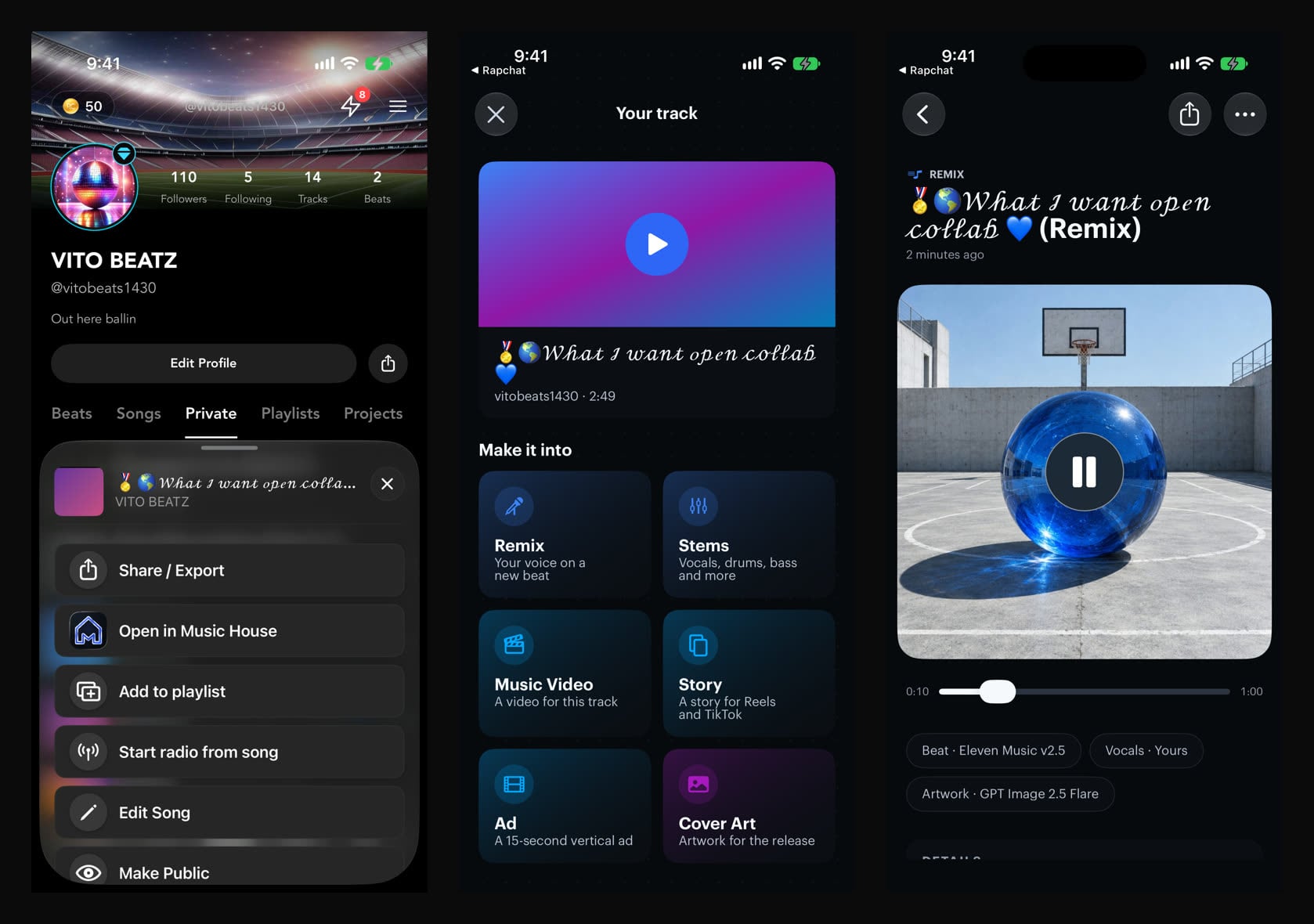
Open one of your tracks, tap the menu, and choose Open in Music House. Music House opens with your track and your vocals already in it.
What you can do with it
- Remix with your vocals. Keep your verse and get a new beat made to its tempo. Music House suggests three directions for your sound, or you describe your own.
- Split the stems. Pull your song apart into vocals and instrumental, or into vocals, drums, bass, guitar, piano and the rest. Mute and solo each part.
- Make something for the release. Turn the song into a music video, a story clip, an ad or cover art, all starting from your track.
How it works
- Update Rapchat to iOS 13.10 or Android 9.4.
- Open one of your published tracks and tap the menu.
- Tap Open in Music House. On iPhone it opens the Music House app if you have it. On Android, and on iPhone without the app, it opens Music House on the web.
- Pick what to make next.
When your track has its vocals stored on Rapchat, Music House uses that clean vocal. It says Your vocals from Rapchat at the top so you know. For other tracks, Music House separates the vocal for you.
Only your own recordings carry over. Music House never clones your voice.
Everything new in Music House is in its changelog. Tell us what you make with it at [email protected].