Record rap vocals over a beat in your browser
Open web Studio. You can try recording before signing in. Choose a beat from the list, or search for one. Use headphones so your microphone does not pick up the beat from your speakers.
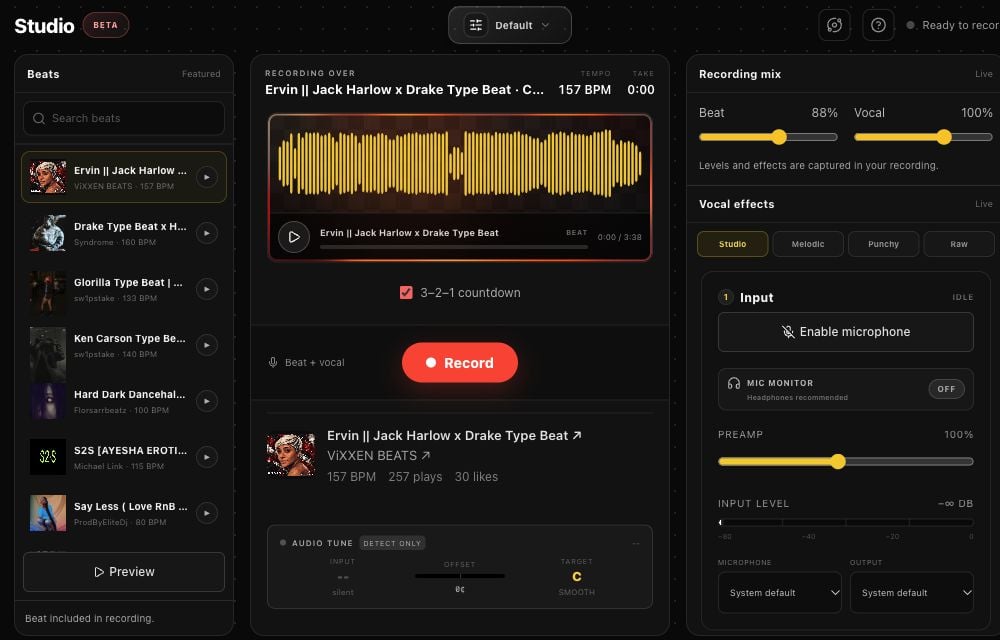
Rapchat web Studio, October 31, 2026. Beat selection on the left, recording in the center, and microphone and effects on the right. Controls stack on smaller screens.
- In Input, choose Enable microphone. Allow microphone access when your browser asks, then select the microphone you intend to use.
- Set your beat and vocal levels in Recording mix. Choose your effects before recording; the levels and effects are captured in the take.
- Choose Record. The optional 3–2–1 countdown gives you time to get ready.
- Record a short test, stop, and listen back. Check that you can hear your voice and the beat and that the timing feels right.
- Record your full take once the test sounds right. Download it, or sign in to publish it to Rapchat.
Keep the Studio tab open until export or publishing finishes. Open the downloaded file to confirm it contains your recording. After publishing, open the song and check that it plays.
My microphone is blocked or silent
If you denied permission, change the microphone permission in your browser's site settings, then try Enable microphone again. Select the correct input under Microphone. Close another app if it is holding the input. Make a short test take before recording the whole song.
If Studio says mixed recording is unavailable, try desktop Chrome, Edge, or Firefox, or use the iOS or Android app. The Browser support button in Studio shows the capabilities available in your browser.
I hear an echo or a delay
Use headphones instead of speakers. If hearing your own voice is distracting, turn Mic monitor off. This controls monitoring, not whether your voice is recorded. Listen back to a short take to check the recorded timing before continuing.
Do I need a download, an account, or a beat license?
You do not need to install the mobile app to record in web Studio. You can try browser recording before signing in; publishing to your Rapchat account requires sign-in. Downloading a recording does not automatically grant rights to commercially release the beat. Check the beat's license and the licensing guide.
What else can I do on the website?
You can browse beats, listen to songs, manage your profile, write in the Lyrics Pad, and use the creator tools. Web and mobile features are not identical. To choose a workflow, see the music app comparisons.